Projects and workspaces
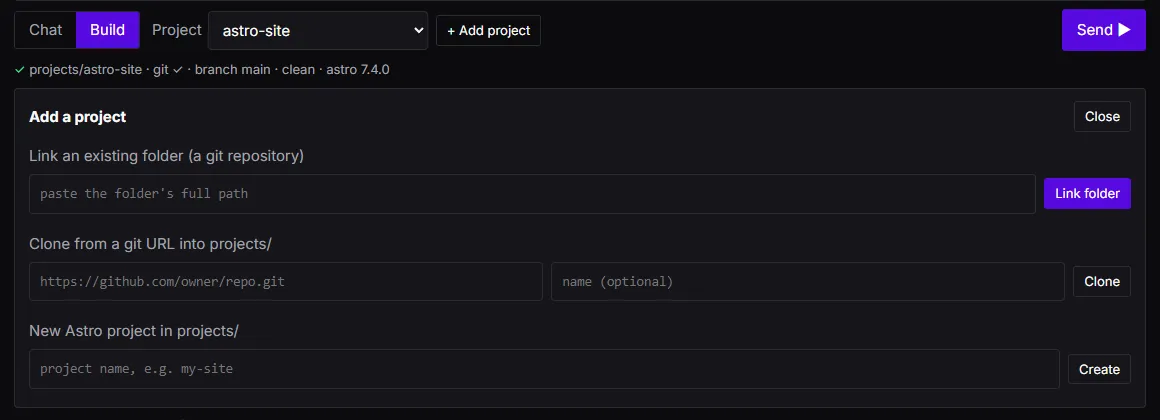
In the app, Build mode works on projects:
- Link an existing folder. Paste its full path once. The harness checks it is the top folder of a git
repository and shows its branch, whether it is clean, and the detected stack and version, or exactly what is
wrong. Linked folders are stored by name in your
config.json. - Clone from a git URL. A shallow clone of an
https://URL intoprojects/<name>. - New Astro project.
npm create astro@latestintoprojects/<name>, then a first commit.
Clone and New Astro project download code, so the app first shows you the exact command and runs it only after you confirm. The app never lists folders on your disk.
Every run works in its own worktree under workspaces/<runId> in the harness’s home, on branch harness/<runId>.
Folders listed in the stack’s dependencyDirs (for Astro, node_modules) are mirrored into the worktree with hard
links, so your project’s tools can run there without reinstalling. The harness never writes to them, and every file it
writes replaces the link instead of writing through it.
To keep the result, merge the branch in your repository:
git merge harness/RUN_IDBuilt by V and Bruno LLC: Astro sites & AI tooling. Work with us →